Automatically collect, centralize, and organize all of your facility’s utility invoices, including electricity, gas, water, and waste, into a single platform.
Use bill anomalies to identify issues
Compare bills to detect unexpected spikes or drops in consumption that may signal equipment failure.
Compare performance across facilities
Benchmark utility consumption and cost of similar buildings in your portfolio to identify high performers and opportunities for improvement.
Facility scheduling and reservations
Automate your end-to-end facility scheduling process to decrease request process friction and increase revenue.
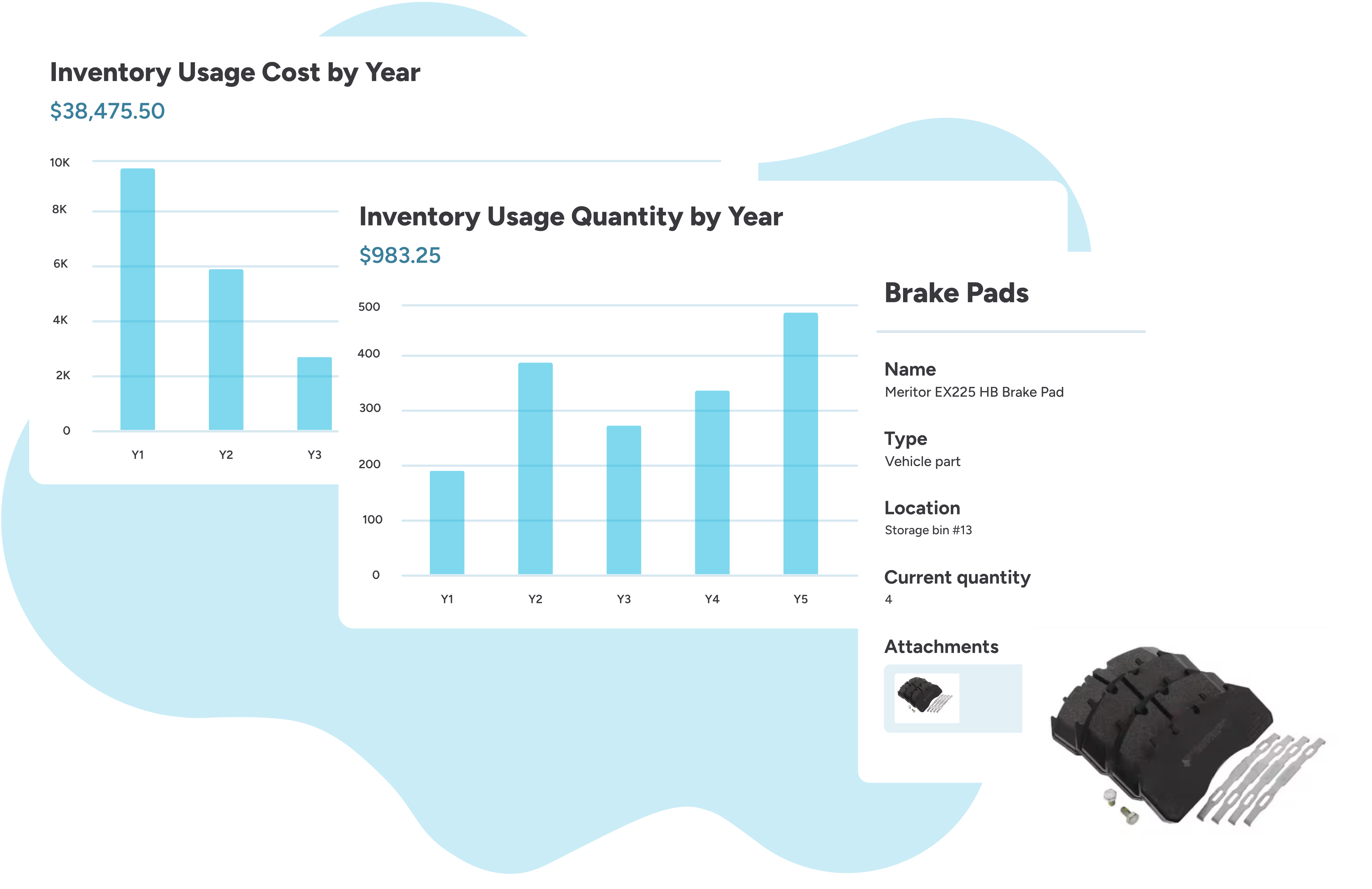
View the exact quantity, location, and condition of all maintenance, repair, and operations parts at any time.
Prevent stockouts
Automatically generate alerts and purchase requests when parts levels drop below pre-set minimum thresholds.
Scan QR codes for easy information retrieval
Look up part specifications, check stock levels, and log usage simply by scanning a QR code with your mobile device.
Manage POs with suppliers
Streamline the procurement process by creating, sending, and tracking purchase orders.
Reports to monitor facility performance
Frequently asked questions about facilities management software
What is facilities management software?
Facilities management software (FMS) is a set of solutions designed to help organizations plan, execute, track, and report on the work needed to keep their facilities operational. The software centralizes requests, asset information, facility requests, and more, allowing facilities teams to keep things running smoothly, reduce downtime, and make data-driven decisions.
What is the difference between a CMMS and a CAFM, and which one is right for my organization?
CMMS software and CAFM software are related, but CAFM software serves broader use cases than CMMS software. A CMMS focuses on maintenance operations, while a CAFM also helps organizations manage space and facilities.
The best option for your organization depends on whether you solely need maintenance execution or require additional functions, such as space and facility planning. A CMMS is best for organizations focused on improving their work order and PM processes for their facilities, while a CAFM is best for organizations with broader needs like facility scheduling, utility management, space planning, and more.
Why does my organization need facilities management software?
Facilities management software allows you to move beyond simply repairing problems and instead focus on maximizing the value of your assets and facilities. Here are some reasons to purchase FM software:
Regular, timely maintenance prevents premature wear-and-tear and significantly prolongs the useful life of major equipment (like HVAC systems and chillers).
Centralized inventory management ensures you have the right spare parts on hand when a repair is needed. This eliminates costly delays, prevents buying parts at emergency markups, and frees up capital that was tied up in unnecessarily large inventory storage.
The system automates the entire maintenance lifecycle, from a simple user request to auto-assigning the work to the right technician and providing mobile tools for resolution.
FM software offers a single, real-time calendar to manage facility reservations.
The data stored in the system allows managers to pinpoint underperforming assets, inefficient sites, or training gaps.
Is there a limit to the number of facilities, assets, or maintenance tasks that I can track?
There is no limit. You can track an unlimited number of facilities, assets, work orders, preventive maintenance tasks, and inspections in the system.
What type of maintenance does the system support?
You can track both reactive and preventive maintenance. This includes reactive work orders submitted by someone in your organization, regular equipment inspections, and time- and meter-based maintenance.
What type of capital projects can I plan and manage?
You can plan and manage a wide range of capital projects and related capital asset activities, from asset replacements to multi-step renovation projects and long‑term replacement planning.
Here are some of the projects you can manage:
Budget‑driven projects and replacement plans
Asset replacements and refreshes: HVAC units, boilers, water heaters, refrigerators, vehicles, tractors, etc.
Capital projects: roofing, flooring, building renovations, electrical/HVAC upgrades, site improvements, technology infrastructure, fleet vehicle capital repairs
How does the system keep an accurate record of on-hand inventory?
You can require technicians to include the inventory used to close out a work order, inspection, or PM task. This field is synced with your inventory records and will automatically update the quantity on hand.
As you approach the low-stock quantity threshold you set, you will receive a notification to order more. Because you can re-order parts with the system, it automatically updates the quantity.
How can a facility manager can make a business case for new software?
Here are four tips for building a strong business case for facility management software:
Lead with data—even if you don’t have a system yet. Start tracking a few meaningful metrics manually (work order volume, completion rates, labor hours) for 60–90 days. If that’s not feasible, borrow credibility from peer organizations who can share their before-and-after results.
Speak your audience’s language. Leadership doesn’t need to understand facilities management; they need to understand why it matters to them. Anchor your case to the metrics they already care about—dollars saved, efficiencies gained, and your organization’s core mission, whether that’s student learning, patient safety, or production uptime.
Anticipate objections before they’re raised. Come prepared with answers to the common pushbacks: user adoption, timing, long-term cost escalation, and procurement requirements. Walking in ready signals you’ve done the homework.
Get creative when the budget is tight. Try “horse trading” across your existing budget lines, use an ROI calculator to quantify intangibles, and know your full departmental budget picture so you can negotiate from a position of credibility.
Manage maintenance, inventory, events, and capital projects in one unified system.
FMX
Other FM systems
Capital planning & forecasting
Prepare for asset replacements, significant facility investments, and budget changes.
FMX
Other FM systems
Built for facilities
Facilities are often an afterthought. But at FMX, we made it the entirety of our business.
FMX
Other FM systems
Facilities management achievement with FMX
Justified four additional teammates
$929K in additional annual revenue
I can look at the history of what we’ve done in a specific room. I know what we’ve replaced and if we’ve had recurring issues like blinds continually needing to be replaced. I can look into everything we’ve done. It’s nice to be able to see when we’ve replaced a motor in an AC unit.
$18K annual inventory savings
We chose FMX for our new plant because it offered our staff the ability to work anytime, anywhere, on any device with an ease-of-use that others couldn’t match. The software is also continuously updated with new capabilities and is cloud-based, so it’s easy and cost-effective to manage.
Benefits of facilities management systems
Extend asset life and value
Eliminate stockouts and control costs
Prevent double-booked spaces and scheduling conflicts
Identify opportunities to improve facility performance
Simplify the work order request, dispatch, and resolution processes
Track inspections and PM tasks
Learn more about buying and implementing facilities management software
The FMX team creates an implementation and onboarding plan based on a 60-day timeframe. However, implementation and time to value are dependent upon your organization’s urgency and pace.
FMX offers a suite of products for facilities management, not a single stand-alone product. This approach allows you to build a system perfectly tailored to your organization’s exact needs.
Each product provides unique value, giving you the flexibility to start with a core solution and easily add other capabilities as your operational needs evolve.












![[Hidden] Iredell-Statesville Schools](https://www.gofmx.com/wp-content/webp-express/webp-images/uploads/2025/04/Iredell-Statesville_thumbnail.png.webp)